SSO ID Admit Card 2026: Download, Check Result & Complete Step-by-Step Guide
Last Updated: May 2026 | Reading Time: 12 minutes | Official Portal: sso.rajasthan.gov.in
Introduction: What This Guide Will Help You Do
SSO ID Admit Card: Millions of government job aspirants in Rajasthan rely on a single credential to access every exam they have applied for the SSO ID. Whether you are waiting to download your REET admit card 2026, checking your CET result or retrieving a police constable hall ticket, the entire process flows through one place; the SSO Rajasthan portal at sso.rajasthan.gov.in.
If you have been confused about where exactly to find your SSO ID admit card, why the portal shows a blank page or how to check your result after the exam you are in exactly the right place. This guide covers every step of the process from login to printout for 2026 exams. It is built around real candidate experiences, verified official steps and every common mistake that causes people to lose precious exam-day time.
You will learn here;
- The exact steps to download your SSO ID admit card in under five minutes.
- How to check your result directly from the SSO dashboard.
- What to do when the portal gives errors or your admit card shows wrong details.
- A verified checklist of everything to carry on exam day.
- FAQs answered in simple language, the way a senior candidate would explain to a junior.
What Is SSO ID and Why Is It the Gateway to Your Exam?
SSO stands for Single Sign-On. The Rajasthan government launched the SSO portal to unify access to over 100 government services from scholarship applications to utility bill payments under one login credential. For competitive exam aspirants, the most critical function of the SSO ID is accessing the Recruitment Portal, which hosts admit cards, results and application records for exams conducted by
- RPSC (Rajasthan Public Service Commission).
- RSMSSB / RSSB (Rajasthan Subordinate and Ministerial Services Selection Board).
- Rajasthan Police Recruitment Board.
- REET (Rajasthan Eligibility Examination for Teachers).
- CET (Common Eligibility Test at Graduate and senior secondary levels).
Your SSO ID is not just a login. It is your permanent digital identity for every Rajasthan government exam you apply for, now and in the future. If you applied for CET 2026 with a particular SSO ID, that same SSO ID is what you will use to download the CET admit card 2026, check your CET result and access future recruitments.
Key point for SSO ID Admit Card 2026: All major Rajasthan government exam admit cards including the REET admit card 2026, CET admit card 2026 and Rajasthan Police SI admit card 2026 are now exclusively accessed through the SSO login. Physical dispatch of hall tickets has been discontinued.
SSO ID Admit Card 2026: Quick Reference Summary
| Detail | Information |
|---|---|
| Official Portal | sso.rajasthan.gov.in |
| Recruitment Portal URL | recruitment.rajasthan.gov.in |
| RSMSSB Official Site | rsmssb.rajasthan.gov.in |
| RPSC Official Site | rpsc.rajasthan.gov.in |
| Admit Card Format | PDF (downloadable, printable) |
| Login Credentials Needed | SSO ID + Password |
| Result Access | Same SSO login → Recruitment Portal → Results tab |
| RPSC Helpline | 0145-2635200 / 0145-2635212 |
| RSMSSB Helpline | 0141-2722520 |
| RSMSSB Email | [email protected] |
Important: Exam-specific admit card release dates vary. Always verify the release date from the official exam notification or the RPSC/RSMSSB homepage before attempting to download.
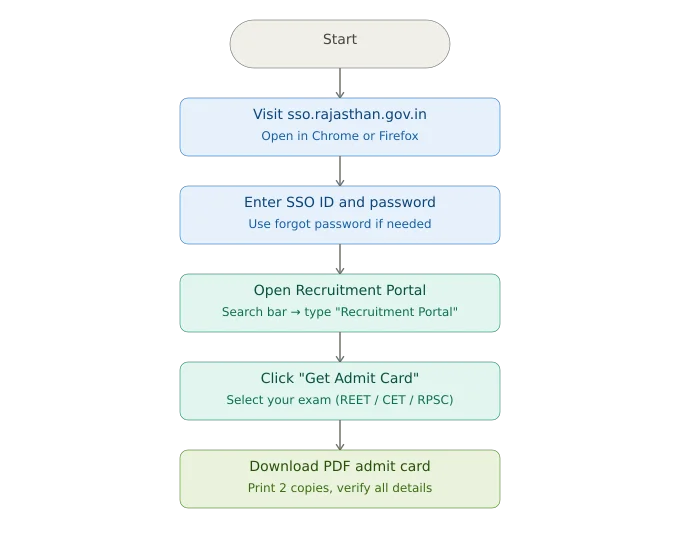
How to Download SSO ID Admit Card 2026: Step-by-Step
This is the exact process that works for REET, RPSC, CET 2026, Rajasthan Police, Home Guard and any other exam hosted on the Rajasthan recruitment portal.
1. Open the Official SSO Portal
Go to sso.rajasthan.gov.in in your browser. Do not use third-party sites that mimic the official portal. Use Google Chrome or Mozilla Firefox for best compatibility. Avoid Internet Explorer or older browser versions because they are known to cause PDF rendering failures on the admit card section.
2. Log In With Your SSO ID and Password
Enter your SSO ID (username) and password on the login page. If you are using the portal for the first time after a long gap, make sure your account is active. Type your password carefully and three failed attempts may temporarily lock your login.
Forgot your password? Click the “Forgot Password” link on the login page. You can recover access through your registered mobile number or email address. This process typically takes two to five minutes.
3. Find the Recruitment Portal on the Dashboard
Once you are inside your SSO dashboard, you will see a grid of services. Use the search bar at the top and type “Recruitment Portal” and it should appear instantly. Click on it to open the Rajasthan State Recruitment Portal.
For RPSC exams like SI (Sub Inspector), School Lecturer or RAS, the admit card may be hosted directly on the RPSC website rather than the recruitment portal. In that case, you will be redirected once you click on the relevant recruitment under your applied services.
4. Navigate to the Admit Card Section
On the Recruitment Portal, look for “Get Admit Card” in the top navigation bar or the main menu. Click on it. You will see a list of all active admit card links corresponding to your applied examinations.
5. Select Your Exam
From the list, identify your exam, for example, CET Admit Card 2026, REET Mains 2026, Rajasthan Home Guard admit card 2026 or Police Constable admit card. Click the relevant exam name or the “Get Admit Card” button next to it.
6. Enter Your Details
Depending on the exam, you may be asked to re-enter your
- Registration number or application ID.
- Date of birth.
- Captcha code.
Enter these carefully. The date of birth format is typically DD/MM/YYYY.
7. Download and Print the PDF
Your SSO ID admit card will load as a PDF file. Click “Download” and save it to your device. Print at least two hard copies and keep one as a backup. If your printer is unavailable, save the file to Google Drive or email it to yourself so you can print from any shop before exam day.
What Is Printed on Your SSO ID Admit Card: Verify Every Detail
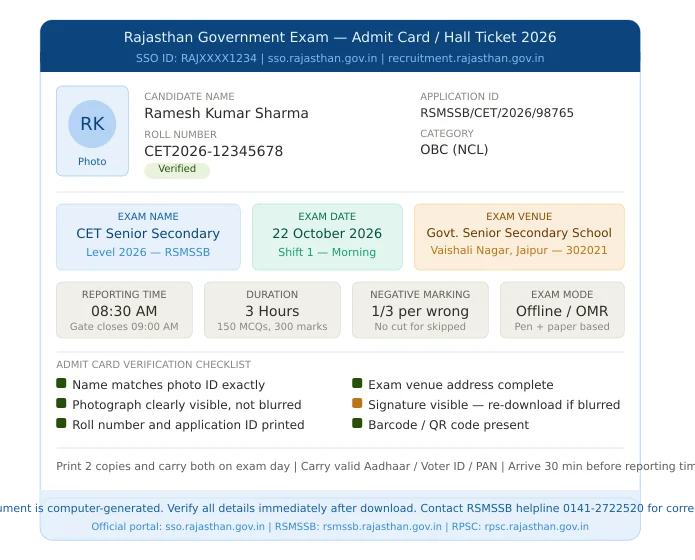
The moment your SSO ID admit card downloads, do not simply save it and walk away. Open the PDF and check each of the following fields carefully:
Candidate Information
- Full name (must match your ID proof exactly and no initials, no missing surnames).
- Candidate photograph (must be clearly visible, not blurred).
- Candidate’s signature.
- Roll number and application ID.
Exam Information
- Exam title (e.g., CET 2026 at the senior secondary level).
- Exam date and day.
- Reporting time and gate-closing time.
- Exam venue name and full address.
Instructions Printed on the Hall Ticket
- List of permitted items (pen type, water bottle rules).
- Prohibited items (mobile phones, smartwatches and calculators unless specified).
- Identity proof requirements and government-issued ID cards are accepted.
- COVID protocols or health-related instructions, if any.
- Barcode or QR code for entry verification.
If your name is misspelled, your photograph is distorted or your exam venue is missing then do not assume it will sort itself out on exam day. Contact the RPSC or RSMSSB helpline immediately and raise a grievance through the official portal. The correction window is typically short and act within 24 to 48 hours of the admit card release.
Common Problems While Downloading And How to Fix Them
Every time an admit card goes live for a major Rajasthan government exam, tens of thousands of candidates hit the portal simultaneously. Here are the most reported problems and their proven fixes.
1. Blank Page After Clicking “Get Admit Card”
Cause: Server overload or browser compatibility issue.
Fix: Wait and try again during off-peak hours; early morning (6–8 AM) or late evening (10 PM–midnight) typically sees lower portal traffic. Also try clearing your browser cache (Ctrl + Shift + Delete in Chrome) before retrying.
2. “No Records Found” or Admit Card Not Visible
Cause: Your application for that exam may not have been successfully submitted or the admit card for that specific exam is not yet released.
Fix: Cross-check the official release notification on the RPSC or RSMSSB homepage. If the release date has passed and your admit card is still not visible, raise a grievance using the Candidate Grievance Portal v2.0 on the RPSC website.
3. Wrong Photograph or Name on the Admit Card
Cause: Incorrect data was submitted during the original application or a technical error during processing.
Fix: Download the admit card anyway and contact the conducting board’s helpline. Carry the original documents with matching details to the exam center. Most centers have provisions to verify your identity separately if the photograph is unclear.
4. PDF Not Opening or Downloading
Cause: Your browser’s PDF viewer may be disabled or your phone’s default app may not support the file format.
Fix: On desktop, ensure Chrome or Firefox is up to date. On mobile, install Adobe Acrobat Reader or WPS PDF viewer. Avoid using the default Samsung Internet browser on Android for PDF downloads from government portals.
5. SSO Login Not Working
Cause: Wrong credentials, account locked or session timeout.
Fix: Use the “Forgot Password” option to reset credentials. If your account is linked to an old mobile number that you no longer have access to, contact the SSO helpdesk at 0141-5123717 or email [email protected].
6. How to Check Your SSO ID Exam Result 2026: Step-by-Step
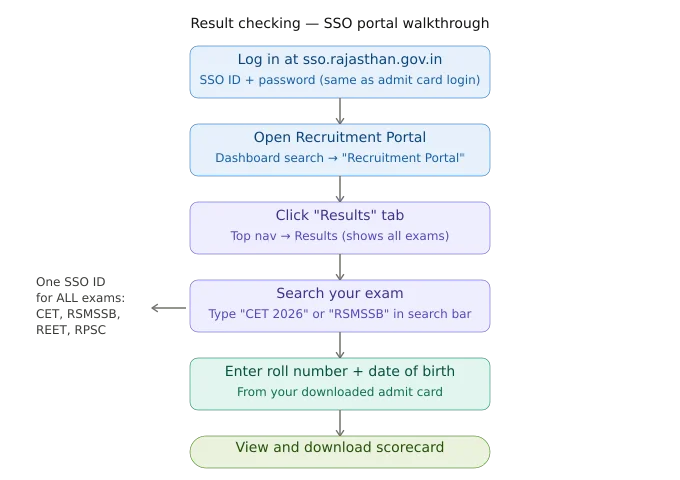
Once your exam is over, result-checking anxiety is real. The good news is that the process is nearly identical to admit card downloading and it runs through the same SSO login and recruitment portal.
Step 1: Log in to SSO at sso.rajasthan.gov.in
Use your existing SSO ID credentials. No new account is needed.
Step 2: Open the Recruitment Portal
From the dashboard, search for and click the Recruitment Portal icon.
Step 3: Click on “Results”
On the Recruitment Portal homepage, find the “Results” tab in the top navigation menu or as a prominent section on the main page. Click on it.
Step 4: Search for Your Exam Result
A search bar will appear. Type the name of your exam for example, “CET 2026” or “RSMSSB Librarian Result” to filter. Alternatively, scroll through the listed results. Click the relevant exam link.
Step 5: Enter Your Roll Number or Registration Details
You will typically need:
- Roll number (from your admit card).
- Date of birth or registered mobile number.
- Captcha.
Submit the form to view your result.
Step 6: Download Your Scorecard
Your marks, percentile and qualifying status will be displayed. Download the result PDF and save it. This scorecard will be required during document verification if you qualify for the next round.
Important: Results for all RSMSSB exams including CET results and RSMSSB sub-category results are accessible with a single SSO ID. You do not need separate credentials for each exam.
SSO Admit Card 2026: Important Dates Across Major Exams
| Exam | Conducting Body | Admit Card | Exam Date |
|---|---|---|---|
| REET Mains 2026 | RSSB | Released Jan 12, 2026 | Jan 17–20, 2026 |
| CET Senior Secondary Level 2026 | RSMSSB | Expected Oct 2026 | Oct 22–24, 2026 |
| Rajasthan Police SI 2026 | RPSC | Released Apr 2, 2026 | Apr 5–6, 2026 |
| RPSC Assistant Professor 2025 | RPSC | Dec 2025 | Jan–Feb 2026 |
| Rajasthan Home Guard 2026 | Home Guard Dept. | As notified | As notified |
Always verify these dates against the official notification. Exam calendars update frequently and date changes like the CET 2026 shift from October 23–26 to October 22–24 and it happen with short notice.
What to Carry on Exam Day: Complete Admit Card Checklist
Your SSO ID admit card is the most important document but it is not the only one. Here is the full exam-day checklist:
Mandatory Documents:
- Printed SSO ID admit card / hall ticket (2 copies recommended).
- Valid government-issued photo ID like Aadhaar card, voter ID, PAN card, driving license, or passport.
- Passport-size photographs (the same as the one submitted during the application, typically 2 copies).
Stationery (as permitted by exam rules):
- Black/blue ballpoint pen (not gel pen unless specifically allowed).
- HB pencil (for OMR-based exams).
- Transparent water bottle.
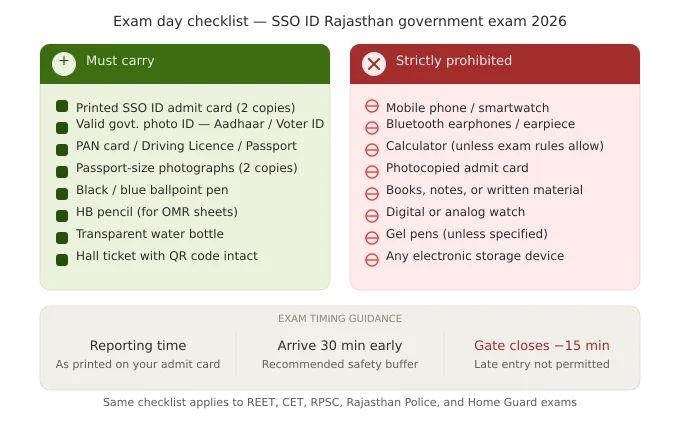
Strictly Prohibited:
- Mobile phones, smartwatches and Bluetooth earphones.
- Calculators (unless it is a paper where calculation tools are allowed and always check exam instructions)
- Digital watches.
- Photocopied admit card (must be a proper print, not a photocopy of a printout).
- Any written material, books or notes.
Arrive at the exam venue at least 30 minutes before the reporting time printed on your SSO ID admit card. Most Rajasthan government exam centers close gates 15 minutes before the exam starts. Candidates who arrive after gate closure are not permitted to enter, regardless of reason.
SSO ID Scholarship: A Note for Students
If you are a Rajasthan government student who has not yet explored the scholarship portal within SSO, it is worth knowing that your SSO ID also unlocks access to the Rajasthan government scholarship scheme.
It is a program that allows eligible students to study at minimal or zero cost. Navigate to the “Scholarship” section within your SSO dashboard to check your eligibility and apply. This is entirely separate from the recruitment/exam section but is available under the same login credentials.
How to Register or Recover Your SSO ID
If you are new to the portal, registration takes under 10 minutes.
To Register:
- Visit sso.rajasthan.gov.in.
- Click “Register.”
- Choose your registration type: Citizen (for exam aspirants), Udyog (business) or Government Employee.
- Enter your Aadhaar number or Bhamashah ID for identity verification.
- Set a username (SSO ID) and password.
- Verify your mobile number via OTP.
To Recover a Forgotten SSO ID:
- Click “Forgot SSO ID” on the login page.
- Enter your registered mobile number.
- An OTP will be sent and enter it to retrieve your SSO ID.
To Reset a Forgotten Password:
- Click “Forgot Password” on the login page.
- Enter your SSO ID.
- Choose recovery via mobile OTP or email.
- Set a new password.
Keep your registered mobile number active and accessible at all times. It is your primary recovery mechanism for both SSO ID and password issues.
Conclusion: Your Action Checklist
Here is a recap of what to do, in the right order:
- Log in to sso.rajasthan.gov.in using your SSO ID and password.
- Open the Recruitment Portal from your dashboard.
- Click “Get Admit Card” and select your exam.
- Verify every detail on the SSO ID admit card before printing.
- Print two copies and keep them safely.
- Carry your admit card and valid photo ID proof to the exam center.
- After the exam, return to the same portal → Results tab to check your score.
Your SSO ID is a long-term asset. Every Rajasthan government exam you will ever appear for, from CET to RAS runs through this single account. Keep your login credentials safe, keep your registered mobile number active and bookmark https://ssoid.se as your go-to starting point for all exam-related tasks.
Good luck with your 2026 exam preparation.
Frequently Asked Questions (FAQ)
Q1. When will the SSO ID admit card 2026 be released?
Admit card release dates are exam-specific. For REET Mains 2026, admit cards were released on January 12, 2026. For CET 2026 (Senior Secondary), release is expected in October 2026. Always check the official RPSC or RSMSSB website for the exact notification.
Q2. How do I check my RSMSSB CET result through SSO?
Log in to sso.rajasthan.gov.in. Open the Recruitment Portal → Click the Results tab → Search for “CET 2026” → Enter your roll number and date of birth → View and download your scorecard.
Q3. Is there a direct link to the admit card without logging into SSO?
Some exams like REET Mains 2026 offer a direct download link on the RSSB website (rssb.rajasthan.gov.in) using just your registration number and password, bypassing the SSO dashboard. Always check the official exam-specific notification for a direct link option.
How to download admit card from the website?
To download your admit card from the SSO Rajasthan portal, follow these steps:
1. Visit SSO Rajasthan Portal in Chrome or Firefox.
2. Log in using your SSO ID and password.
3. Open the Recruitment Portal from the search bar.
4. Click on “Get Admit Card.”
5. Select your exam such as REET, CET or RPSC.
5. Download the admit card PDF and print copies after checking all details carefully.
What is the official website of Rajasthan Home Guard admit card 2026?
The official website of Rajasthan Home Guard admit card 2026 is sso.rajasthan.gov.in.
.
.