The Jan Soochna Portal (also called Jan Suchna Portal) is an online government portal created by the Government of Rajasthan. It provides citizens with information about many state government schemes, government services and beneficiary information in one place. Through this information portal, people can easily check scheme information, ration card details, pension details and other public data without visiting government offices.
Earlier, people had to file RTI requests under the Right to Information Act, 2005 to get government details. Now the portal gives online access to government information, beneficiary data and public data. This improves government transparency, increases accountability, and helps citizens understand how government departments provide benefits.
Overview of Jan Soochna Portal Rajasthan
The portal name is Jan Soochna Portal and it works as the main Rajasthan government portal for public scheme information. It was launched on 13 September 2019 by the Government of Rajasthan to make accessible data available to citizens.
| Feature | Details |
|---|---|
| Portal | Jan Soochna Portal / Jan Suchna Portal |
| State | Rajasthan |
| Launch Date | 13 September 2019 |
| Developed By | Government of Rajasthan |
| Official Website | jansoochna.rajasthan.gov.in |
| Departments | 100+ departments |
| Schemes | 300+ schemes |
| Languages | Hindi, English |
Main Purpose of Jan Soochna Portal
The main goal of the Rajasthan Jan Soochna Portal is to provide real-time access to government information. It helps citizens check scheme coverage, beneficiary lists and other essential public information.
Important objectives:
- Improve transparency and public data access.
- Provide online disclosure of government schemes.
- Increase accountability of officials.
- Encourage citizen participation and feedback.
- Support e-governance initiatives.
The portal also helps reduce RTI queries because most information is already available online.
How to Access Jan Soochna Portal
Citizens can access the portal using a mobile phone, tablet or computer with an internet connection.
- Visit website: Open jansoochna.rajasthan.gov.in
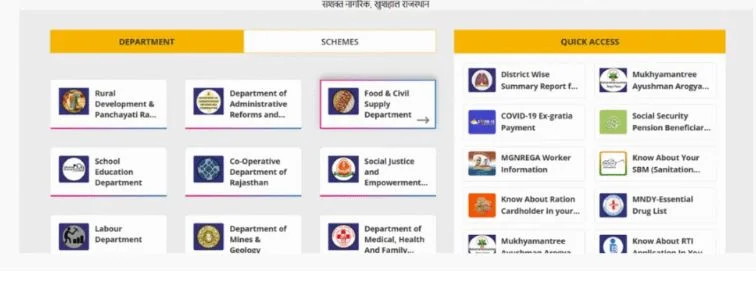
- Open portal homepage: The portal homepage shows a department list.
- Choose department: Select departments like Rural Development, Education Department, Food & Civil Supplies or Medical Health & Family Welfare
- View scheme services: Click to see department services and scheme services.
How to Search Information on the Portal
The portal has a search tool that helps users quickly find information. You can search using:
- Aadhaar Number
- Ration Card Number
- Name search
- District, Block, Village, Panchayat
Reports can also be downloaded in PDF format.
How to Check Scheme Availability
Users can check scheme availability by using the following steps.
- Open department selection.
- Choose the scheme of interest.
- Browse the list of schemes.
- Use keyword search or scheme name.
The portal will show:
- Local availability.
- Detailed information.
- Latest updates section.
How to Check Eligibility for Government Schemes
The portal also helps citizens check eligibility results before applying.
- Select the scheme.
- Choose sectors like the health sector, the education sector, the social justice sector or the rural development sector.
- Enter name, Aadhaar number, ration card number, district, block and village.
The portal will show:
- Benefits details
- Enrolled status
- Approval pending
- Beneficiary list
Benefits of Jan Soochna Portal
The Jan Soochna Portal offers many advantages.
Transparency
- Improves government transparency.
- Increases officials’ accountability.
- Supports corruption control.
Convenience
- Access anytime and anywhere.
- Easy online availability.
Financial Benefits
- Saves time and money.
- Completely free service.
Social Benefits
- Supports empowered citizens.
- Helps social status improvement.
- Encourages economic status improvement.
List of Documents Required
Some services may require these documents
- Aadhaar Card
- Ration Card
- Jan Aadhaar Card
- Bhamashah ID
- bank account details
- caste certificate
- income certificate
- residence proof
- disability certificate
- pension passbook
- job card
How to File a Complaint
If users find incorrect information, they can submit a complaint online. This helps report discrepancy information.
- Visit the portal and click the homepage link.
- Select “Register Complaint.”
- Fill the complaint form.
- Enter required details.
- Complete OTP verification and identity verification.
- Submit a complaint.
Popular Schemes on the Portal
Some major schemes available include:
- Jan Aadhaar
- PM Kisan Samman Nidhi Yojana
- MGNREGA
- Unemployment Allowance Scheme
- Mukhyamantree Ayushman Arogya Yojana
- Palanhar Yojana
- Public Distribution System Ration
- NFSA Beneficiaries