When you forget your SSO ID or password, it can be stressful. But recovering it is easy if you follow the right process. The SSO Portal Rajasthan allows citizens, Udyog (businesses) and government employees to regain access to their accounts. This guide explains the full process of SSO ID recovery. So, you can log in and continue using government services without problems.
How to Recover Your SSO ID in Rajasthan
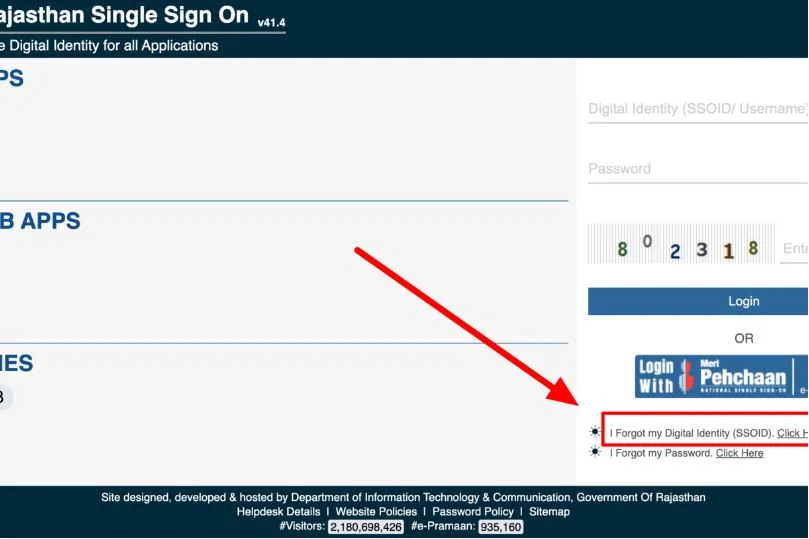
- Visit the official portal at https://sso.rajasthan.gov.in/.
- On the homepage, click the Login to RajSSO link.
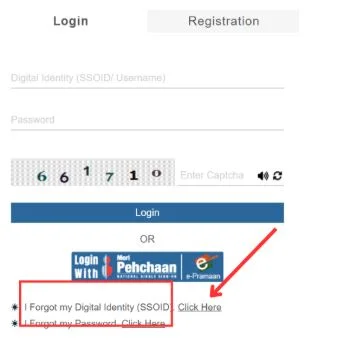
- When the login form opens, select the option “I forgot my digital identity (SSOID).”
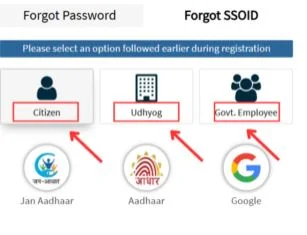
- This will open the Forgot Password / Recovery Form, where you will find three options depending on your account type.
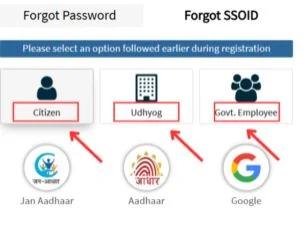
- Choose from available options
- Citizens
- Udyog
- Government Employee
Choose the right option to recover your SSO ID.
1. How Citizens Can Recover SSO ID
If you are a citizen, follow these simple steps to recover your SSO ID:
- Select account type, citizen.
- Choose recovery options: Jan Aadhaar, Aadhaar or Google.
- Enter all required details correctly.
- Submit the form and verify the information.
- Set a new password and save it.
- Log in to your SSO portal account.
2. How Udyog (Business) Can Recover SSO ID
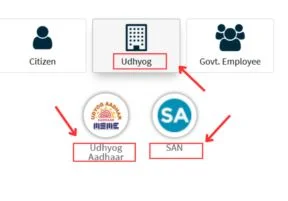
For business accounts, recovery requires some extra steps because of business details. The recovery options are Udyog Aadhaar and SA (Sanstha Aadhaar / related business ID).
- Select account type: Udyog.
- Enter your Udyog Aadhaar or related business ID.
- Verify the business details carefully.
- Set a new password and save it.
- Log in to the SSO Portal.
3. How Government Employees Can Recover SSO ID
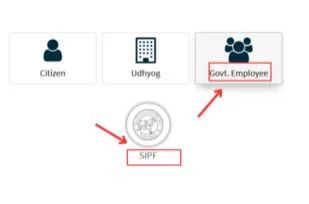
Government employees can recover their SSO ID using their SIPF number. Follow these steps carefully.
- Select account type: Government Employee.
- Enter your SIPF number and required details.
- Verify information correctly.
- Reset or set a new password.
- Log in to your account.
Full Recovery Process Overview
| Account Type | Recovery Options | Steps to Follow |
|---|---|---|
| Citizen | Jan Aadhaar, Aadhaar, Google | Enter details, verify, set new password and log in. |
| Udyog (Business) | Udyog Aadhaar, SA | Enter business details, verify, set password and log in. |
| Government Employee | SIPF Number | Enter SIPF, verify, reset/create password and log in. |
How to Recover SSO ID Rajasthan Using SMS
You can also recover your SSO ID via SMS if you have forgotten it. The steps are:
- Send an SMS from your registered mobile number.
- Type the message: RJ SSO.
- Send it to 9223166166.
- You will receive information about your SSO ID recovery.
Note: The SMS must come from your registered mobile number. Your account must have been logged in at least once after 07/09/2018.
FAQs About SSO ID Recovery
Yes, use the Forgot Password / Recovery Form or SMS recovery options.
Jan Aadhaar, Aadhaar or Google account information.
Use Udyog Aadhaar or SA (Sanstha Aadhaar / related business ID) and follow the verification steps.
Enter your SIPF number, verify details and reset or create a new password.
Send RJ SSO to 9223166166 from your registered mobile number.
Yes, after recovery, your SSO ID works for all linked Rajasthan government services.
You must have logged in at least once after 07/09/2018.