How to Fill IPR in SSO ID Rajasthan 2027 | Immovable Property Return Guide
How to Fill IPR in SSO ID Rajasthan: Are you a Rajasthan government employee who needs to fill IPR but does not know where to start?
This guide shows you exactly how to fill out IPR in SSO ID Rajasthan step by step. We cover what IPR is, why you must file it, how to log in, how to fill out each section, common mistakes and what happens if you miss the deadline.
What is IPR in SSO ID Rajasthan?
IPR stands for Immovable Property Return. It is an annual property declaration form. Every Rajasthan government employee must fill it.
In this form, you declare:
- Land and plots you own.
- Houses and buildings you own.
- Property owned by your spouse or dependent family members.
The Rajasthan government uses IPR to promote transparency and accountability among public workers. It is a key part of the Rajasthan Service Rules.
Why Is IPR Compulsory?
The Rajasthan government wants honest records of assets held by its employees. IPR makes sure every employee openly declares their immovable assets each year. It is not a tax. It is a compliance requirement. Missing it can lead to serious consequences, including salary being withheld.
Who Must Fill IPR?
All regular Rajasthan state government employees must file IPR every year. This includes:
- Teachers and education department staff.
- Medical and health department employees.
- Police officers.
- Revenue and administrative staff.
- Secretariat and office employees.
- All-India service officers posted in Rajasthan.
If you receive a regular government salary in Rajasthan, you must submit IPR.
IPR Deadline: When to File
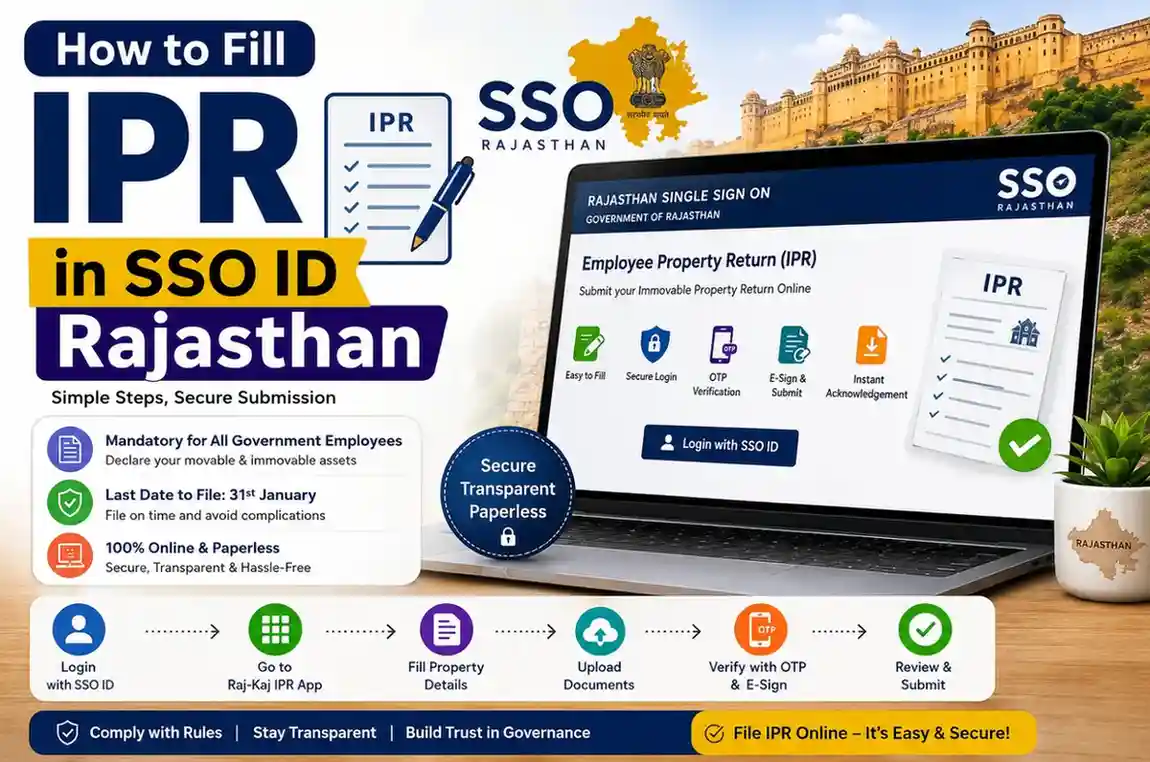
The standard last date to fill IPR is January 31 of each year. The IPR you file in January reflects the property position as of January 1 of that year.
For example:
- IPR filed by January 31, 2027 shows your property as of January 1, 2027.
The Rajasthan government sometimes extends the deadline. Always check the official Rajkaj portal for the latest circular. In 2025, the government issued an extension circular on April 10, 2025. So check before the deadline every year.
What You Need Before You Start
Before you fill out the IPR in SSO ID Rajasthan, keep these things ready.
1. Your SSO ID and password: You log in through the Rajasthan SSO portal.
2. Your mobile number linked to SSO: You need this to receive the OTP for verification.
3. Your SIPF or employee number: This links your profile in the Rajkaj IPR module.
4. Property documents If you have immovable property, keep these ready:
- Registry or sale deed.
- Khasra / Jamabandi for agricultural land.
- Plot allotment letter.
5. Loan documents (if any): Home loan statement, vehicle loan and GPF advance details. If you have no property at all, you can still file a Nil Property Return.
How to Login to SSO ID for IPR Filing
Follow these steps to log in.
Step 1. Open your browser and go to sso.rajasthan.gov.in.
Step 2. Type your SSO ID and password in the login box.
Step 3. Fill in the captcha shown on screen.
Step 4. Click the Login button.
Step 5. You will land on your SSO dashboard. All your government services appear here.
You can also use the Raj-Kaj app on your mobile. Download it from Google Play. Log in with your SSO credentials and access the IPR module directly from your phone. You can fill IPR in SSO ID Rajasthan on the mobile Raj App.
How to Fill IPR in SSO ID Rajasthan: Step by Step
Once you are logged in to the SSO dashboard, follow these steps carefully.
Step 1: Open the Rajkaj IPR Application
On your SSO dashboard, search for “Rajkaj” or “Rajkaj IPR” in the search bar. Click on the Rajkaj IPR app icon. It will open the Rajkaj IPR dashboard. You can also directly visit erajkaj.rajasthan.gov.in. Click Sign In / Fill IPR and log in with your SSO ID.
Step 2: Update Your Profile
Before you fill any property details, you must update your profile. Click “Update Profile” in the top right corner of the Rajkaj IPR dashboard. Check all the details shown, such as your name, designation, department, SIPF number and mobile number. If anything is wrong, correct it first. Wrong profile data can cause errors later. Once the details look correct, check the declaration checkbox and click Update. Your profile is now ready.
Step 3: Select the Assessment Year
After your profile is updated, the form opens. Select the assessment year you are filing for. For example, if you are filing in January 2027, select the year 2026.
Step 4: Fill Personal and Service Details
Your basic details like name, designation, department and pay scale will be auto-filled from your SSO or SIPF profile. Check that all details are correct. Fill in any remaining fields manually if needed. Click Next to proceed.
Step 5: Declare Your Immovable Property
This is the most important section of the IPR form.
If you have NO immovable property:
Look for the checkbox that says “Please check to fill IPR with no property return” or similar wording. Check that box. Click Submit. This files a Nil Property Return.
If you HAVE immovable property:
Fill in the location details of each property. For each property, provide:
- Type (residential, agricultural and commercial).
- Location (district, tehsil, village or city).
- Area (in square meters and bigha hectare)
- How you got it (purchased, inherited, gifted).
- Value (use circle rate or registration value).
- Ownership of self, spouse and dependents jointly.
You can add multiple properties. Use the Add button to add each one. You can also Update or Delete any entry before submitting.
Who counts as a dependent? Your spouse and minor children whose names appear on property are included. Declare their properties too.
Step 6: Save and Check Your Property List
After adding all properties, review the full list. Make sure names, values and ownership details are correct. This is the right time to catch mistakes. Once submitted, editing is difficult.
Step 7: Submit the IPR
When you are satisfied with all entries, click “Submit IPR”. A popup appears asking for OTP authentication. Check the declaration box in the popup. Enter the OTP sent to your registered mobile number or email. This is your e-sign, your digital signature confirming the submission. Click Submit. Your IPR is now legally submitted and securely stored in the Rajasthan government’s digital records.
Step 8: Download and Print the Acknowledgement
After submission, a receipt or acknowledgement is generated. Download it immediately. Print a copy and keep it for future reference. This receipt is proof that you filed your IPR. You may need it for:
- Salary processing.
- Promotion files.
- NOC applications.
- Any departmental compliance check.
How to File Nil Property Return in Rajasthan SSO
Many employees confuse this step. If you, your spouse or any dependent family member does not own any immovable property, you still have to fill IPR in SSO ID rajasthan. You just file a Nil Property Return Rajasthan.
Here is how:
- Log in to Rajkaj IPR dashboard.
- Go to the IPR File section.
- Check the box for “No immovable property.”
- A confirmation page shows your Nil declaration details.
- Click confirm and then click Submit IPR.
- The form submits with Nil property.
- Download the receipt.
This is valid. Your compliance is complete even with a Nil return.
How to Fill Each Property Type
Residential Plot or House
- Enter the address (colony, ward, city).
- Enter area in square meters or square yards.
- Enter value at the time of purchase or current circle rate.
- Select ownership: self or joint.
Agricultural Land
- Enter survey number (khasra number).
- Enter village, tehsil district.
- Enter area in bigha or hectare.
- Enter value as per Jamabandi or circle rate.
Inherited or Gifted Property
- Select “Source: Inherited / Gifted.”
- Enter the year you received it.
- Enter the value at that time.
Co-owned Property
- Select “Owned by Joint.”
- Enter your share percentage.
- Enter co-owner name and relation.
Property in Spouse’s Name
- Under “Owned by,” select “Dependent Spouse”
- Enter the spouse’s name and the property details
Movable Property: What to Declare
The IPR form also asks about movable assets. This section includes:
- Vehicles: car, motorcycle, tractor (enter registration number and value).
- Jewellery: total weight and approximate value.
- Bank accounts: balance in savings and FD accounts.
- Shares and mutual funds: total market value.
- LIC and insurance policies: total sum assured.
- Cash in hand: amounts above the normal limit.
These figures are checked by the vigilance department if any complaint arises.
Liabilities, Loans and Dues
You also declare your outstanding loans:
- Home loan balance from bank or housing board.
- Vehicle loan balance.
- Personal loan from bank.
- GPF advance taken from the government.
- Any other dues.
This gives the government a complete picture of your financial position.
Common Mistakes When Filing IPR on SSO
Many employees make small errors that cause problems. Avoid these:
1. Not updating profile before filing: Always update your profile in Rajkaj before you start the IPR form.
2. Wrong assessment year selected: Double-check the year. Filing for the wrong year wastes your time.
3. Forgetting to include spouse or dependent property: IPR covers your entire family. Do not skip dependent properties.
4. Entering market value instead of circle rate: Use the government-registered circle rate or stamp duty value. Not the current market price.
5. Not downloading the acknowledgement: Always save the receipt. Without it, you cannot prove you filed.
6. Not adding a recent property transaction: If you bought or sold property during the year, you must update it. Neglecting recent property transactions is a common compliance mistake.
7. Filing too close to the deadline: The portal gets heavy traffic near the last date. File early to avoid session timeouts or OTP delays.
Common Technical Errors and Fixes
Sometimes the portal gives errors. Here is how to fix the most common ones.
- “Employee Not Found” Error
- This means your profile is not properly linked.
Fix: Check your SSO ID and SIPF synchronization. Go to your Rajkaj profile and update it. If the mismatch is in SIPF, contact your DDO to correct the SIPF number.
- OTP Not Received
Check that your mobile number in SSO is correct and linked to your Aadhaar. Try requesting the OTP again after 60 seconds. If it still does not arrive, check your SMS inbox or email (the OTP is also sent to the registered email).
- Form Not Saving / Session Timeout
Do not keep the form open for too long without activity. Fill it in one sitting. If it times out, log back in. Your saved entries are usually retained.
- Assessment Year Not Visible
This happens when the IPR window for that year has not opened yet is closed. Check the Rajkaj portal for the official circular on the filing period.
How to Edit IPR After Submission
Once submitted, you cannot directly edit your IPR from the employee side.
You have two options:
Option 1: Correct before the last date through DDO. Contact your Drawing and Disbursing Officer (DDO) or Head of Department (HOD). They can initiate a correction request.
Option 2: Contact SIPF Rajkaj helpdesk. Email: [email protected] You can also raise a support request at erajkaj.rajasthan.gov.in.
Always try to get corrections done before the January 31 filing deadline.
What Happens If You Do Not File IPR?
Not filing IPR in SSO ID Rajasthan is a serious matter.
Under the Rajasthan Service Rules, failure to file IPR can lead to:
- Salary being withheld by your DDO
- Entry on your service record
- Departmental action in extreme cases
If you missed the deadline, you can still file a late IPR during the extended window. The Rajasthan government usually issues extension circulars. To file late, follow the same process. The portal remains open during the extended period. If you need a formal condonation, apply to your department with a written explanation.
Benefits of Filing IPR Online via Rajasthan SSO
Before online filing, government employees had to submit physical forms. Now the process is fully digital.
Here is why online filing is better:
- Paperless process: No forms to fill by hand.
- Secure OTP-based e-signature: Your submission is verified digitally.
- Improved transparency: The Rajasthan government can track compliance in real time.
- Fewer inaccuracies: Auto-filled data from SIPF reduces human error.
- Easy retrieval: You can view and download past IPR records anytime.
- Convenience: File from home on your phone using the Raj-Kaj app.
- Digital records: Your IPR is securely stored and legally valid.
The Rajkaj IPR system is part of Rajasthan’s push toward a fully digital government.
Real Use Case: How a Teacher Filed IPR in 10 Minutes
Here is a quick real example to show how simple the process is.
Ramesh (a government school teacher in Jaipur) needed to fill his IPR for 2026. He had one residential plot (self-owned) and no loans. Employees who fill IPR in SSO ID Rajasthan on time avoid increment delays, promotion holds and vigilance complications.
This is what he did:
- Went to sso.rajasthan.gov.in and logged in.
- Searched for Rajkaj IPR on the dashboard.
- Updated his profile (took 2 minutes).
- Selected year 2025.
- His name and designation auto-filled.
- Added his plot details, location, area circle and rate value.
- Reviewed and clicked Submit IPR.
- Entered the OTP received on his mobile.
- Downloaded the receipt.
Teachers, police and health staff all fill IPR in SSO ID Rajasthan using the same Raj-Kaj portal login process.
How to View Old IPR Records
Want to check your previously filed IPR?
Via SSO: sso.rajasthan.gov.in → Login → Rajkaj → IPR → View Old IPR
Via DOP Portal: dop.rajasthan.gov.in → Immovable Property Return section
Via Rajkaj Website: rajkaj.rajasthan.gov.in → Reports → IPR Details
You can view all your past IPR submissions from 2018 onwards. Always fill IPR in SSO ID Rajasthan on time.
Key Metrics and Compliance Data
IPR filing compliance in Rajasthan has improved sharply since the process moved online.
- IPR records are publicly searchable by department on the Rajkaj portal.
- The Rajasthan government issues circulars every year as the deadline approaches.
- Extensions are common, always check the latest circular at rajkaj.rajasthan.gov.in.
- The Rajkaj portal covers IPR data from 2018 to 2026 for all employees.
- Retiring employees are also required to fill IPR in SSO ID Rajasthan as part of their final no-dues clearance process.
- The only official way to fill IPR in SSO ID Rajasthan is through the Raj-Kaj module.
- Newly recruited employees must fill IPR in SSO ID Rajasthan within 30 days of joining government service.
The digital system has made it significantly easier to track and verify employee compliance across all departments. If you face any technical issue, contact: [email protected].
Frequently Asked Questions About IPR in SSO Rajasthan
What is IPR in SSO ID?
IPR means Immovable Property Return. It is a yearly form that Rajasthan government employees fill on the SSO portal. You declare all immovable assets held by you, your spouse dependent family members.
What is the last date to fill IPR in Rajasthan?
The standard deadline is January 31 each year. The government sometimes extends this. Check rajkaj.rajasthan.gov.in for the latest circular.
How do I fill IPR on the Rajasthan SSO portal?
Login at sso.rajasthan.gov.in → Go to Rajkaj app → Update profile → Select assessment year → Add property details → Submit IPR with OTP → Download receipt.
What if I have no property to declare?
You still need to file. Select the “No Property” checkbox in the Rajkaj IPR module and submit. This is called a Nil Property Return Rajasthan. Your compliance is complete.
Is ancestral property included in IPR?
Yes. If any inherited or ancestral immovable property is in your name or your dependent’s name, you must declare it.
What if property is in my spouse’s name?
Declare it under the “Dependent Spouse” section in the Rajkaj IPR form.
Can I file IPR from the Raj-Kaj mobile app?
Yes. Download the Raj-Kaj app from Google Play. Log in with your SSO credentials and access the IPR module directly from your mobile.
What is the difference between IPR and APR?
IPR (Immovable Property Return) covers land, plots buildings. APR (Annual Property Return) is a broader term sometimes used at the central level. In Rajasthan, the commonly used term is IPR, filed through the Rajkaj application on SSO.